
Learning the 6502 by Building a KIM-1 Simulator
A PAL-2 kit is on the way, so I built a hardware-faithful KIM-1 simulator in Go to learn the MOS 6502 while I wait.
Until recently, most of my eight-bit nostalgia belonged to a different branch of the family tree. I grew up with the Intel 8080 and Zilog Z80, so those were the processors I naturally cared about. The MOS 6502 was familiar, of course, but mostly as the CPU inside other people's childhood computers.
That changed after I "discovered" the CL9 Core universal remote. The CL9 uses a 6502-compatible processor, and trying to understand that wonderfully overengineered remote pulled me into its schematics, firmware and assembly code. Somewhere along the way, the 6502 stopped being a historical footnote for me and became something I wanted to learn properly.
A real board is on the way
For a more hands-on introduction, I ordered a PAL-2 kit. It follows and recreates the design of the KIM-1, MOS Technology's small 6502 computer from 1976. It has the hexadecimal keypad, six seven-segment displays, monitor ROM, serial terminal interface and the wonderfully limited amount of memory that makes every byte count.
The kit is currently waiting at customs. I am looking forward to building it and bringing it to life. Hopefully I will not need the oscilloscope this time. I plan to solder carefully. But if I do need it, well, that is why I bought an oscilloscope, right?
Waiting with a simulator
I am not very good at waiting for new hardware, so I started building a KIM-1 simulator in Go with Claude Code.
There are already several good KIM-1 emulators. I was after something slightly different: a virtual replica that behaves like the hardware rather than a convenient software approximation of it. For example, the serial output is not produced by intercepting the monitor ROM routine that prints a character. The simulator watches the changing value of the RIOT output pin and reconstructs the serial frame from its start bit, eight data bits and stop bit. Input travels back through the simulated input pin in the same way.
I took the same approach to the display and keyboard. The simulator models the RIOT ports, address decoding and external multiplexing logic. The display only shows what the CPU produces by scanning the digits, and key presses reach the monitor through the simulated keypad matrix. There is no hidden shortcut that says, in effect, "the ROM wants to display this number now."
More than a CPU emulator
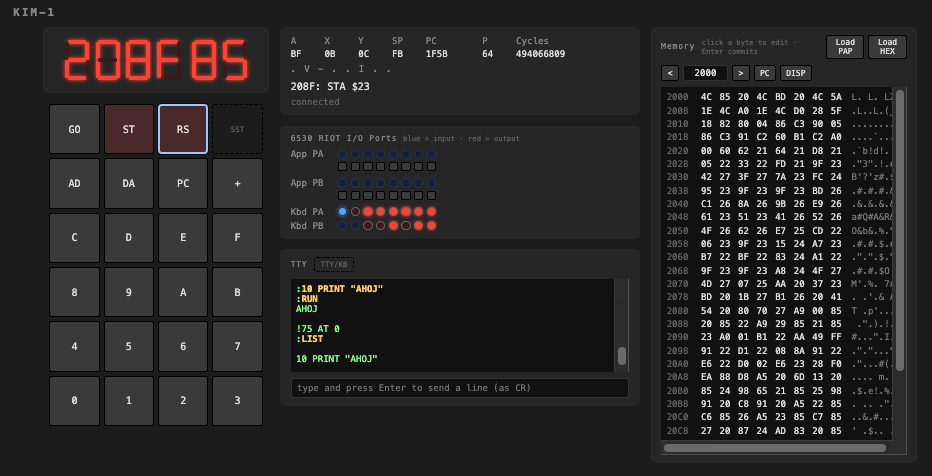
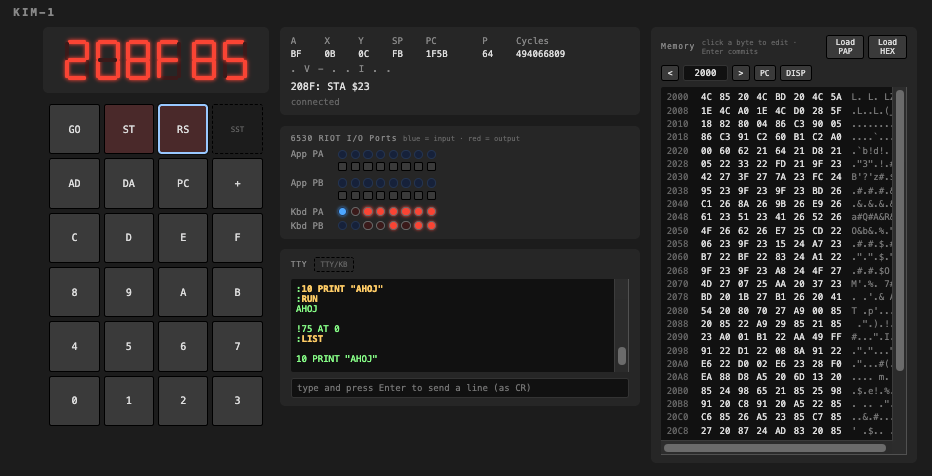
The project now includes a cycle-accurate implementation of the official 6502 instruction set, both MOS 6530 RIOT chips, their I/O ports and timers, the KIM-1 memory map, the keypad, display and TTY interface. The web UI adds a live view of the registers, I/O pins and memory without changing how the simulated machine itself works.
I later added optional RAM expansion, covering the address space from $2000 to $FFF9. That was enough to move beyond tiny machine-code experiments. Tiny BASIC is now running, which feels like a rather satisfying milestone for a machine that began with barely more than 1 KB of onboard RAM.
Next: Forth
With Tiny BASIC working, my next experiment is Forth. By the time the PAL-2 finally clears customs, I may already know my way around the KIM-1 monitor and have a small collection of programs ready for the real board.
The simulator is on GitHub: github.com/jrydval/kim1-simulator-go.